
3D40.45 • Laser Visualization of Sound
Location: Cabinet 5
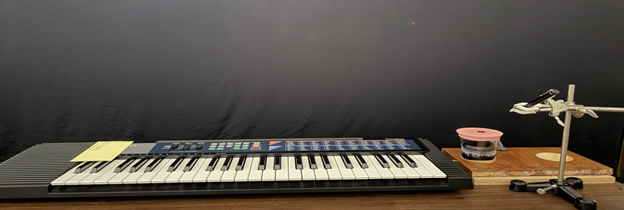
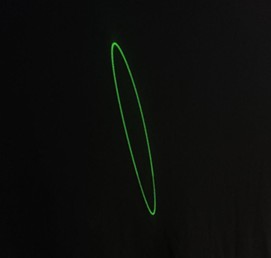
Photos show the demonstration used at the University of Texas at Austin.
Concepts Conveyed:
- Notes played contain multiple tones and demonstrate linear combinations of the normal modes of the rubber diaphragm, creating complex patterns.
- Simulation of LIDAR, remote sensing technology to map 3D objects
- Resonant frequencies at specific tones demonstrate simple patterns due to mechanical waves.
- Demonstrates the phenomenon of persistence of vision, an optical illusion where the retina retains an image after it disappears, perceiving a continuous motion.
Instructions/Notes:
- Clamp the wood base onto the table.
- Turn on the speaker by flipping the switch on its side (a noise will play once turned on).
- Connect a device to play sound or tones using bluetooth or use an aux cable to connect the keyboard to the speakers.
- For the keyboard, slide the switch labeled POWER/CHORD one notch down to turn on and adjust the volume accordingly.
- Grab the stand and ensure the laser pointer is clamped into place.
- Turn on the laser by allowing the clamp to press the button on the laser pointer down, then position the laser to reflect off of the mirror ensuring it’s in a good position (the further from the surface the better).
- Play a song or a tone to demonstrate patterns.
Demo Staff:
- The speaker does turn off after some time of inactivity, just turn it off and on again.
- Ensure that the diaphragm on the plastic cup isn’t torn. If it is, cut the bottom half of a balloon off and stretch the top part over the cup, then tape/glue the mirror in place. If in a hurry, use double sided tape that fits the entirety of the mirror to prevent extra “noise”.
- For bluetooth: If the device isn’t connected already, press and hold the button with an M on it. Once the speaker starts to beep, check the device’s bluetooth section to pair.
Last updated on June 17, 2026